If your campaign needs funds to be paid to an international bank account, the process is slightly different from a local payout. While it does take a bit more time and admin, we’re here to guide you every step of the way.
This guide explains how international payouts work for both Blue Tick campaigns and To Owner campaigns, what documents you’ll need, and what to expect along the way.
International Payouts for Blue Tick Campaigns
Blue Tick campaigns work a little differently to To Owner campaigns.
The key thing to remember is this:
Blue Tick campaigns are verified at payout stage, not at campaign creation.
Step 1: Request a payout
When you’re ready to access funds, log into your campaign dashboard and submit a payout request.
Step 2: Enter beneficiary banking details
For Blue Tick campaigns, the beneficiary must be an organisation, not a personal bank account.
Examples of acceptable beneficiaries include:
-
A hospital or medical practice
-
A doctor or specialist
-
A school or university
-
A registered organisation or service provider
You’ll need to upload:
-
Proof of bank account (for the organisation)
-
An invoice or quote
You may submit the same invoice more than once, as long as it clearly shows:
-
The organisation’s name
-
Their bank account details
Step 3: Submit and notify us
Once you’ve submitted the payout request:
Email [email protected]
Let us know:
-
You’ve submitted a payout request
-
It’s for a Blue Tick campaign
-
You need the funds paid to an international bank account
Step 4: Complete the Global Payout Form
Our team will send you a Global Payout Form
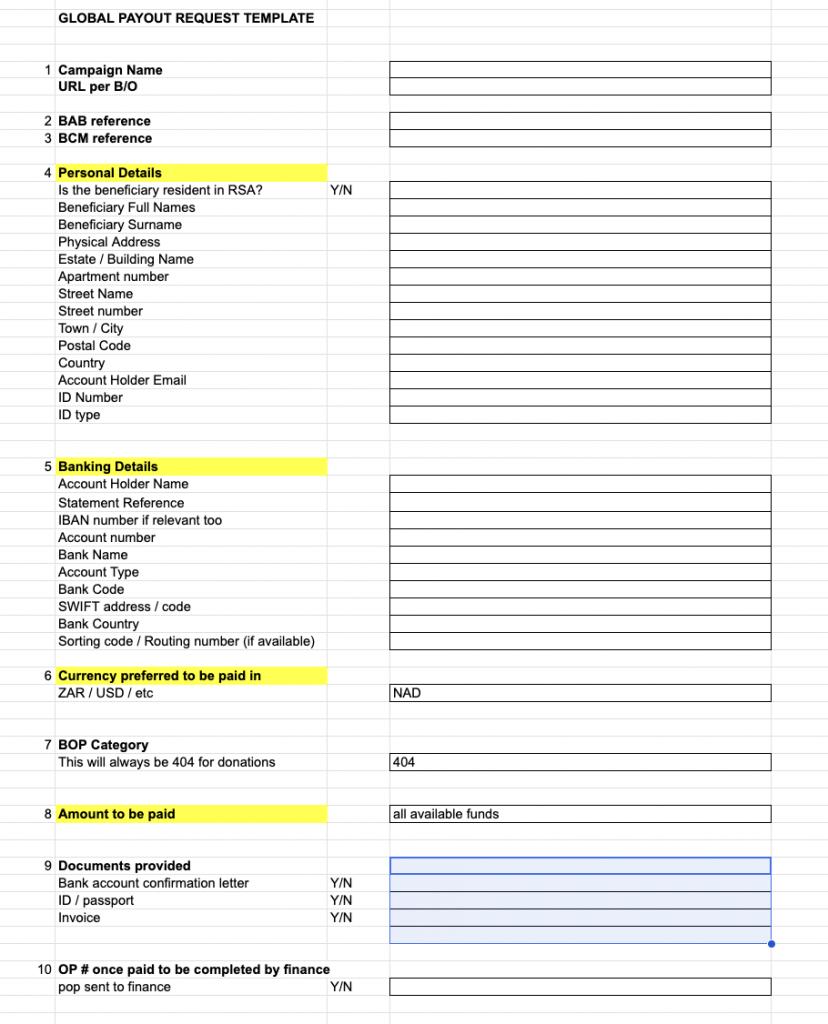
Please fill this form in carefully and in full.
Important notes:
-
Next to Amount to be Paid, make sure you enter either all available funds or the exact amount you want paid
-
International payouts are manual
-
You must submit a new Global Payout Form for every payout request
Once completed, send the form back to us (or to your campaign manager).
Step 5: Processing & timelines
After we receive the form:
-
We submit it to our finance team
-
The payout is processed manually
International payouts take longer than local payouts
While timelines can vary, we recommend allowing 2–4 weeks for a successful international transfer.
International Payouts for Self-Managed Campaigns
Self-managed campaigns pay funds into a personal bank account, but there are a few important things to note for international payouts.
Before anything else:
Your campaign must receive at least one successful donation before it can be verified.
Step 1: Upload verification documents
When you’re ready, upload the following to your campaign under the verification tab:
-
Campaign creator’s ID
-
Supporting documents (e.g. invoice, quote, or formal proof showing how donations will be used)
-
Proof of banking
-
International bank account details
Step 2: Email our team
Email [email protected]
Let us know:
-
You’ve submitted your verification documents
-
You require an international payout
Step 3: Complete the Global Payout Form
We’ll send you the Global Payout Form.
Please:
-
Complete it in full
-
Double-check all details before submitting
Important:
You will need to submit a new Global Payout Form for every payout request on your campaign.
Step 4: Verification & payout
Once:
-
Your campaign is successfully verified
-
All documents check out
We’ll process your international payout.
As with Blue Tick campaigns, international payouts are manual, so please allow 2–4 weeks for funds to reflect.
A Few Final Things to Remember
-
International payouts take longer than local payouts
-
Accuracy is important, incomplete or incorrect information can cause delays
-
A new Global Payout Form is required for every international payout request
-
If you’re ever unsure, our team is here to help
We know this process can feel overwhelming, especially when funds are urgently needed. Thank you for your patience, and for the important work you’re doing through your campaign.