by Tessa Van Rensberg | Jan 28, 2026 | Tips for using BackaBuddy
If your campaign needs funds to be paid to an international bank account, the process is slightly different from a local payout. While it does take a bit more time and admin, we’re here to guide you every step of the way.
This guide explains how international payouts work for both Blue Tick campaigns and To Owner campaigns, what documents you’ll need, and what to expect along the way.
International Payouts for Blue Tick Campaigns
Blue Tick campaigns work a little differently to To Owner campaigns.
The key thing to remember is this:
Blue Tick campaigns are verified at payout stage, not at campaign creation.
Step 1: Request a payout
When you’re ready to access funds, log into your campaign dashboard and submit a payout request.
Step 2: Enter beneficiary banking details
For Blue Tick campaigns, the beneficiary must be an organisation, not a personal bank account.
Examples of acceptable beneficiaries include:
You’ll need to upload:
You may submit the same invoice more than once, as long as it clearly shows:
Step 3: Submit and notify us
Once you’ve submitted the payout request:
Email [email protected]
Let us know:
-
You’ve submitted a payout request
-
It’s for a Blue Tick campaign
-
You need the funds paid to an international bank account
Step 4: Complete the Global Payout Form
Our team will send you a Global Payout Form
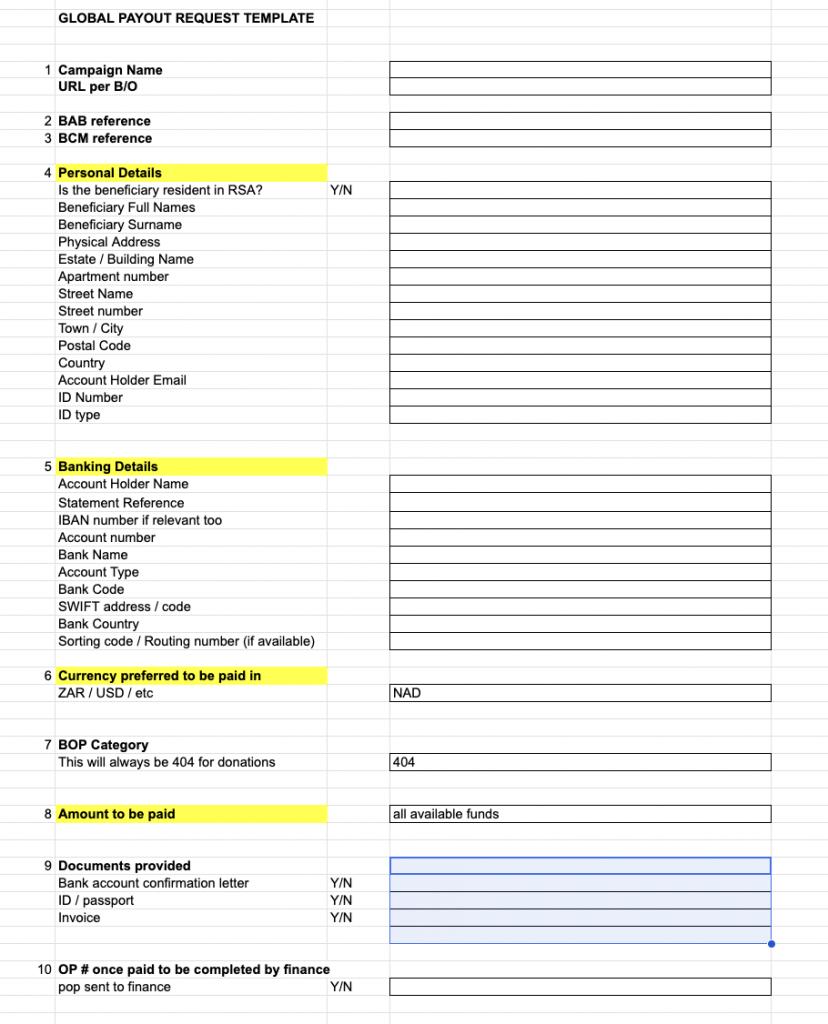
Please fill this form in carefully and in full.
Important notes:
-
Next to Amount to be Paid, make sure you enter either all available funds or the exact amount you want paid
-
International payouts are manual
-
You must submit a new Global Payout Form for every payout request
Once completed, send the form back to us (or to your campaign manager).
Step 5: Processing & timelines
After we receive the form:
International payouts take longer than local payouts
While timelines can vary, we recommend allowing 2–4 weeks for a successful international transfer.
International Payouts for Self-Managed Campaigns
Self-managed campaigns pay funds into a personal bank account, but there are a few important things to note for international payouts.
Before anything else:
Your campaign must receive at least one successful donation before it can be verified.
Step 1: Upload verification documents
When you’re ready, upload the following to your campaign under the verification tab:
-
Campaign creator’s ID
-
Supporting documents (e.g. invoice, quote, or formal proof showing how donations will be used)
-
Proof of banking
-
International bank account details
Step 2: Email our team
Email [email protected]
Let us know:
Step 3: Complete the Global Payout Form
We’ll send you the Global Payout Form.
Please:
Important:
You will need to submit a new Global Payout Form for every payout request on your campaign.
Step 4: Verification & payout
Once:
We’ll process your international payout.
As with Blue Tick campaigns, international payouts are manual, so please allow 2–4 weeks for funds to reflect.
A Few Final Things to Remember
-
International payouts take longer than local payouts
-
Accuracy is important, incomplete or incorrect information can cause delays
-
A new Global Payout Form is required for every international payout request
-
If you’re ever unsure, our team is here to help
[email protected]
We know this process can feel overwhelming, especially when funds are urgently needed. Thank you for your patience, and for the important work you’re doing through your campaign.
by Tessa Van Rensberg | Sep 2, 2025 | Tips for using BackaBuddy
At BackaBuddy, we want your fundraising experience to be as smooth as possible—including getting your funds out when you need them! Whether you’re running a self-managed campaign or a Blue Tick campaign, here’s a simple, step-by-step guide to help you request a payout, plus tips for a hassle-free process.
Before You Request a Payout
For Self-Managed Campaigns
Before you can request a payout, your campaign must be verified by the BackaBuddy team.
This means:
-
Upload all required documents for verification.
-
Wait for your campaign to be checked by the BackaBuddy team.
-
Once verified, a BackaBuddy Verified Badge will appear on your campaign page, and the “Payout Request” button will turn purple and become available.
Tip: If you see the “Payout Request” button greyed out, double-check your documents and make sure your campaign has been fully verified!
Verification Guide: How do I verify my Campaign? – BackaBuddy
For Blue Tick Campaigns
Blue Tick campaigns (where donations are paid directly to an organisation or service provider) do not require campaign verification before requesting a payout.
How to Request a Payout
Steps 1–9 (For Both Self-Managed & Blue Tick Campaigns)
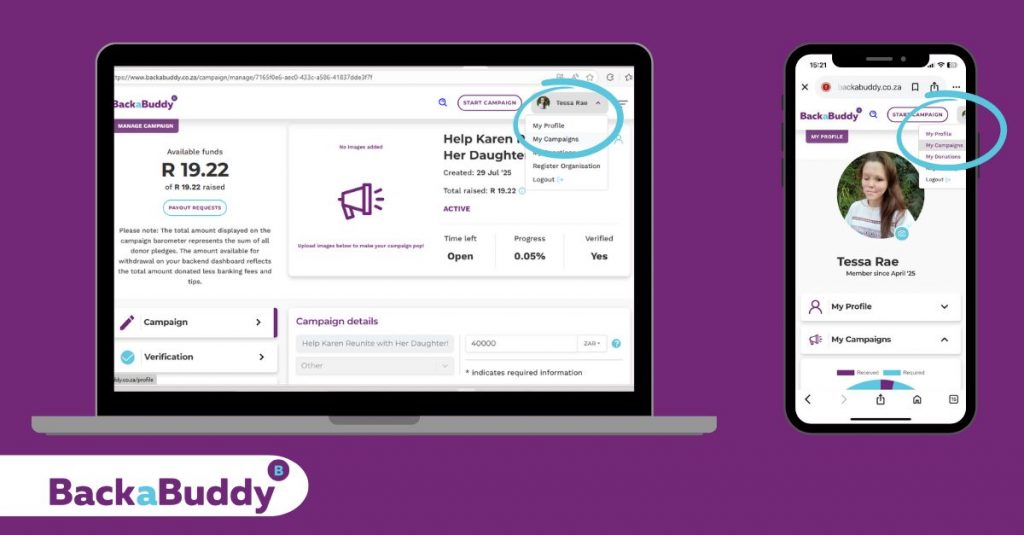
- Hover over your profile name (top right-hand corner).
- Select “My Campaigns” from the dropdown.
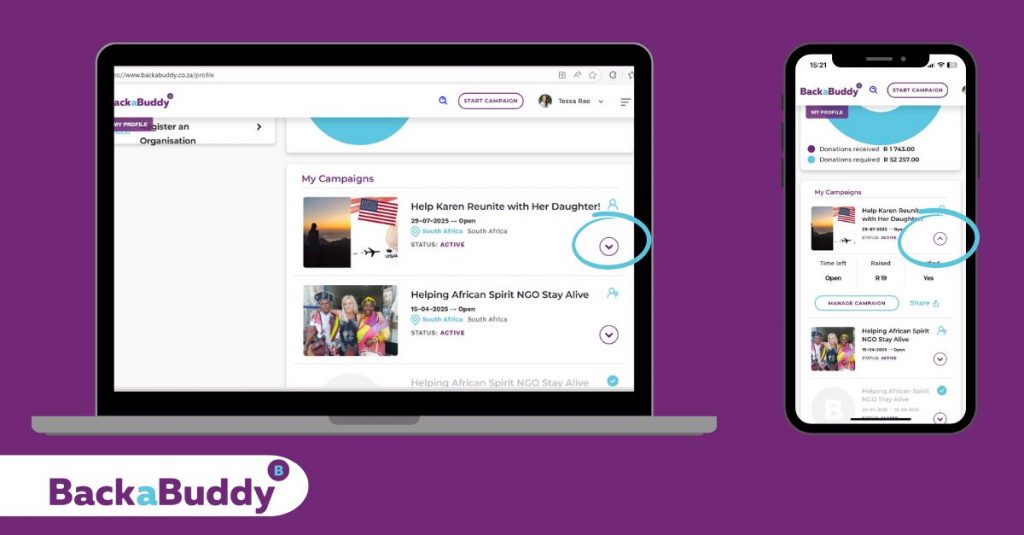
- Scroll down to find your campaign’s banner and title, below the donation summary circle.
- On the right, click the purple circle with a purple dropdown arrow.
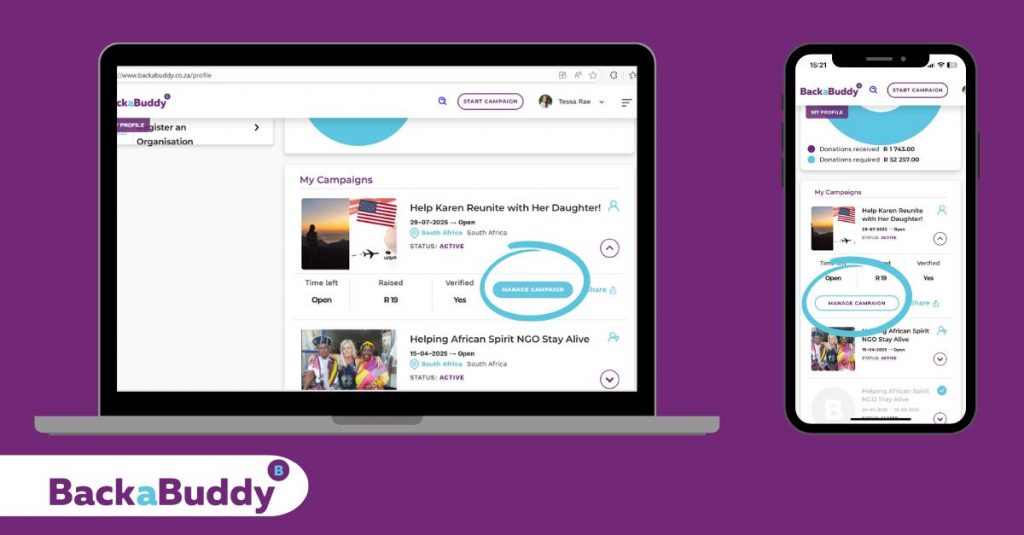
- Click on “Manage Campaign”.
6. On the left, select the purple “Payout Request” button.
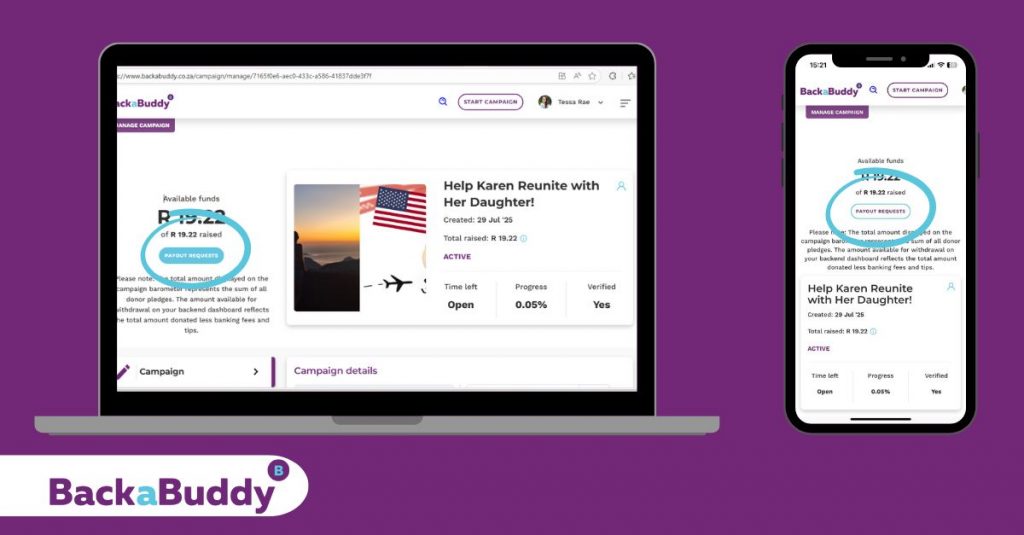
7.
-
PC View: Tick the small circle next to your campaign’s name in the summary.
-
Mobile View: Click on “Funds Breakdown” dropdown arrow and then tick the small circle next to your campaign’s name in the summary.
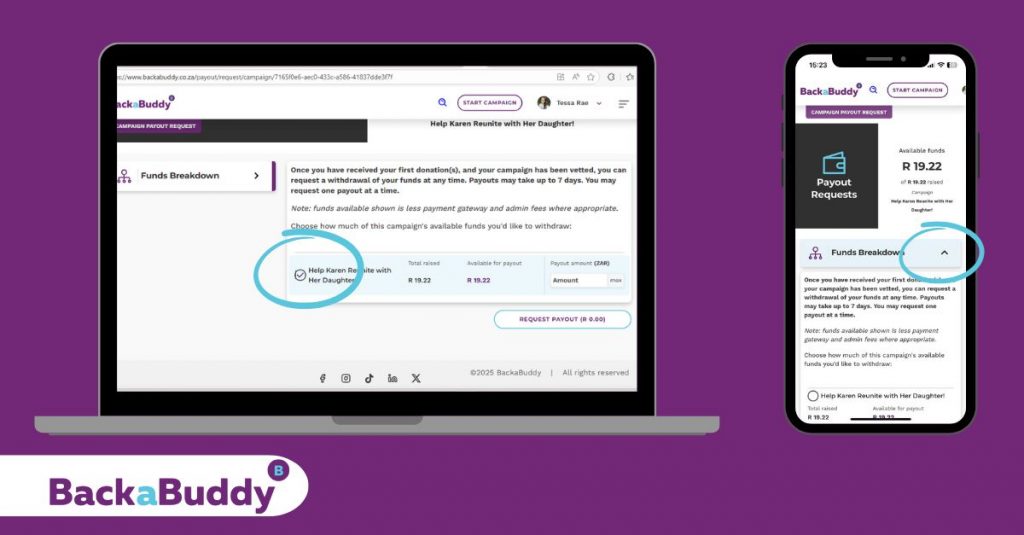
8. Enter the amount you wish to withdraw in the “Payout Amount” box.
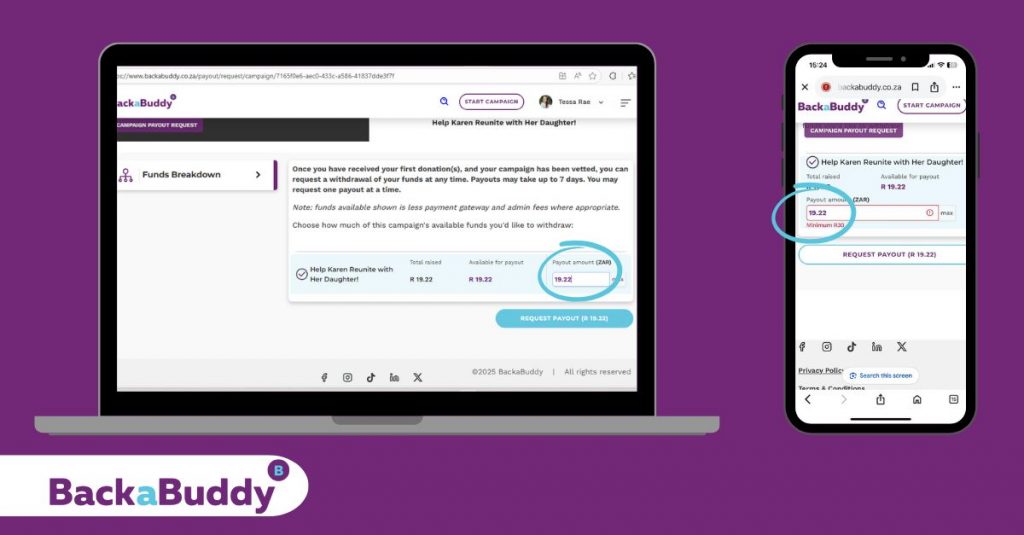
9. Click “Request Payout”.
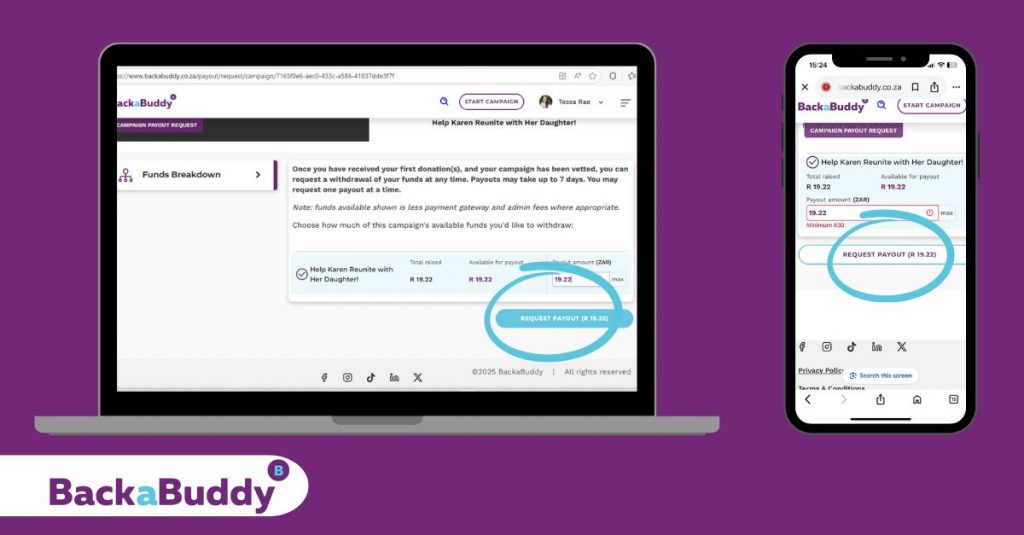
The Payout Journey Splits Here
A. Blue-Tick Campaigns
10. You’ll be prompted to upload supporting documents. Choose one of the following:
-
Invoice: If you have an invoice from the organisation you need to pay.
-
Or a Reimbursement Claim: If you’ve already paid and are claiming back, upload your proof of payment. You’ll also need to upload your proof of banking details.
-
Organisation’s proof of Banking Details: If the payment is to an organisation’s bank account (the usual option). You can upload the same invoice if the banking details are clearly displayed.
Tip: If PDF uploads fail (usually due to file size), take a screenshot and upload the image instead!
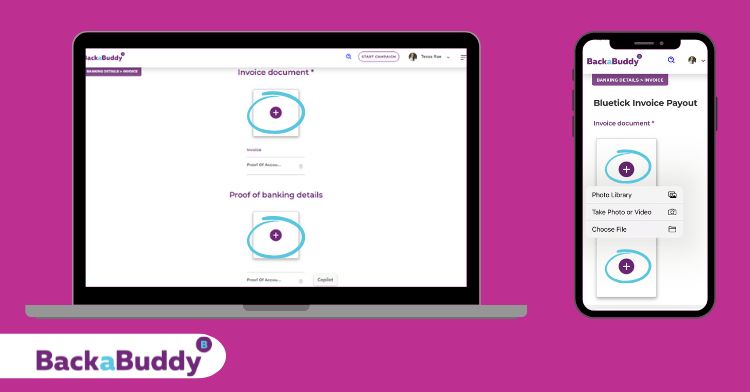
11. Upload your document(s) by clicking the “+” in the square boxes. (One document per block.)
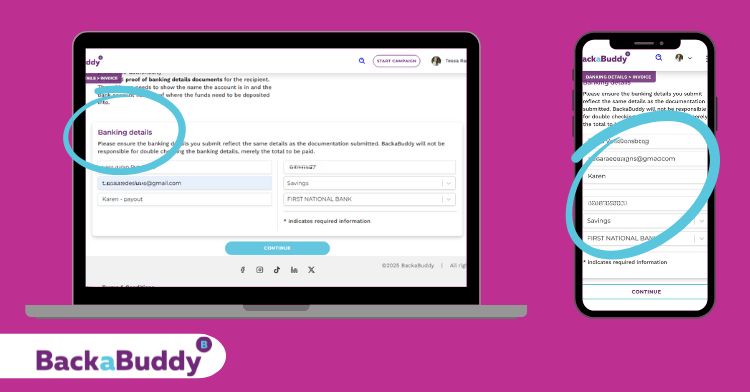
12. Enter the organisation’s bank account details—make sure these match your uploaded proof or the details on the invoice.
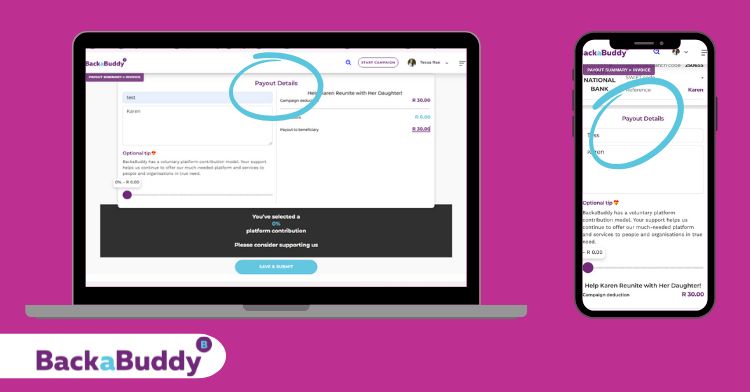
13. Leave a tip for BackaBuddy (optional).
14. Click “Save and Submit” at the bottom.
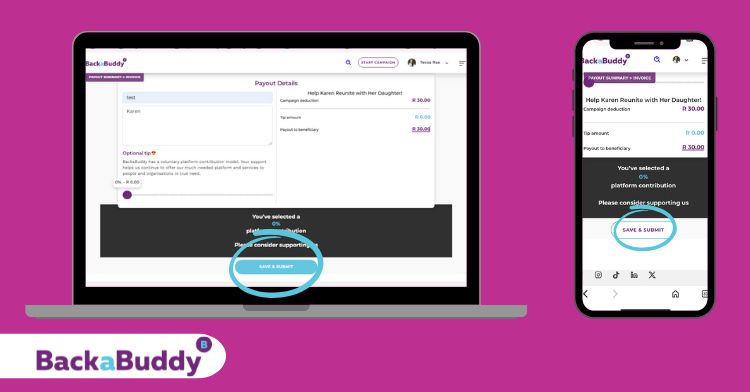
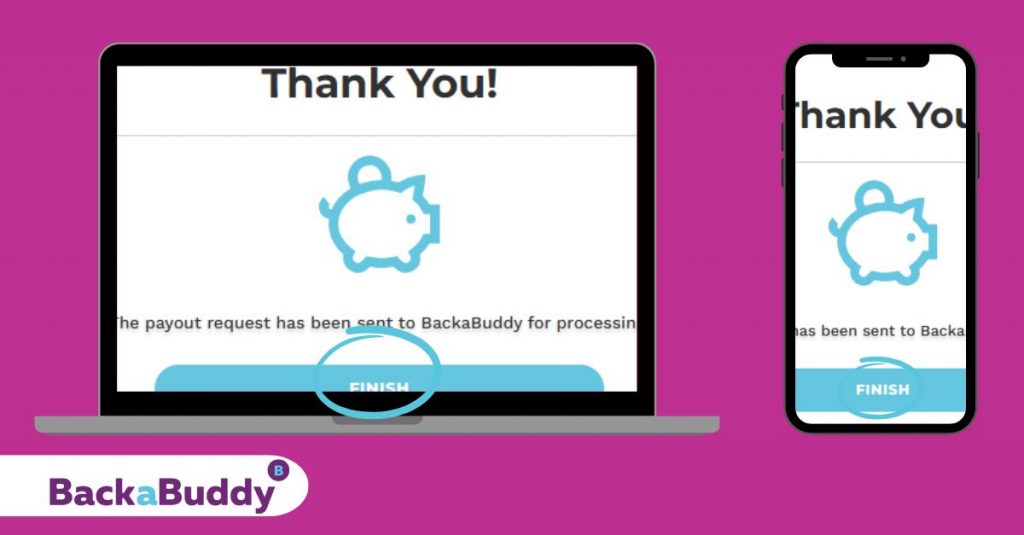
15. If completed successfully, a small pop-up will confirm your payout request has been sent for processing. Click “Finish” to complete.
B. Self-Managed Campaigns
Funds are paid into the campaign creator’s bank account or beneficiary of choosing (as uploaded and verified during campaign setup).
10. After clicking “Request payout”, complete the payout form: add a clear title and description, and double-check the banking details.
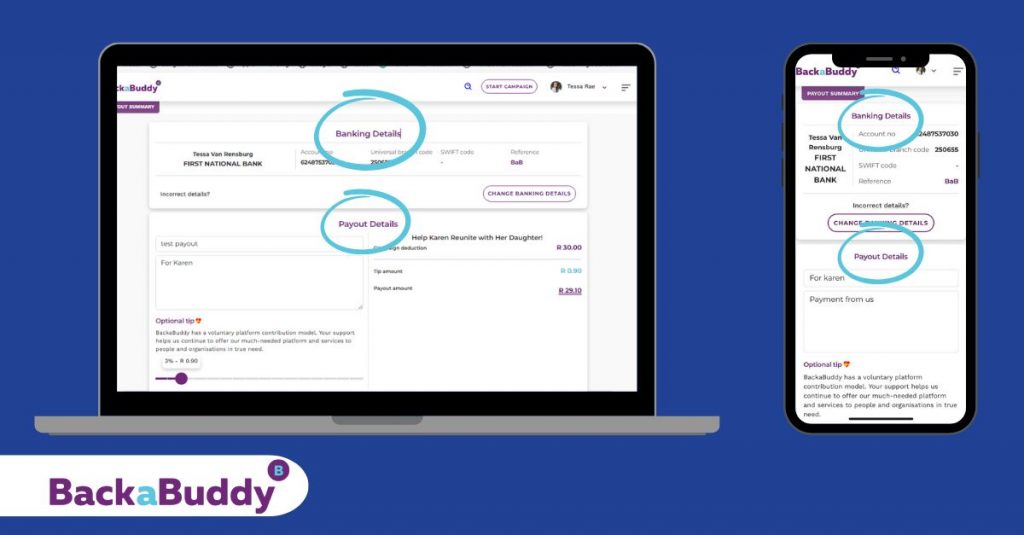
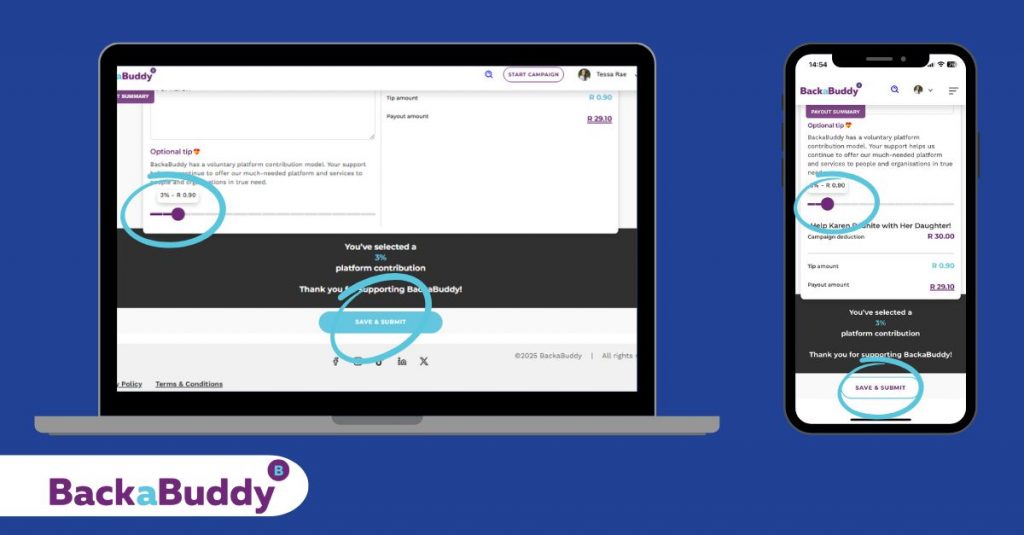
11. (Optional) Add a tip.
12. Click “Save & Submit.”
13. A confirmation pop-up will confirm your payout request was sent for processing. Click “Finish” to complete.
Tracking Your Payout Request
Once you’ve submitted your payout request, you can track its progress right in your dashboard:
-
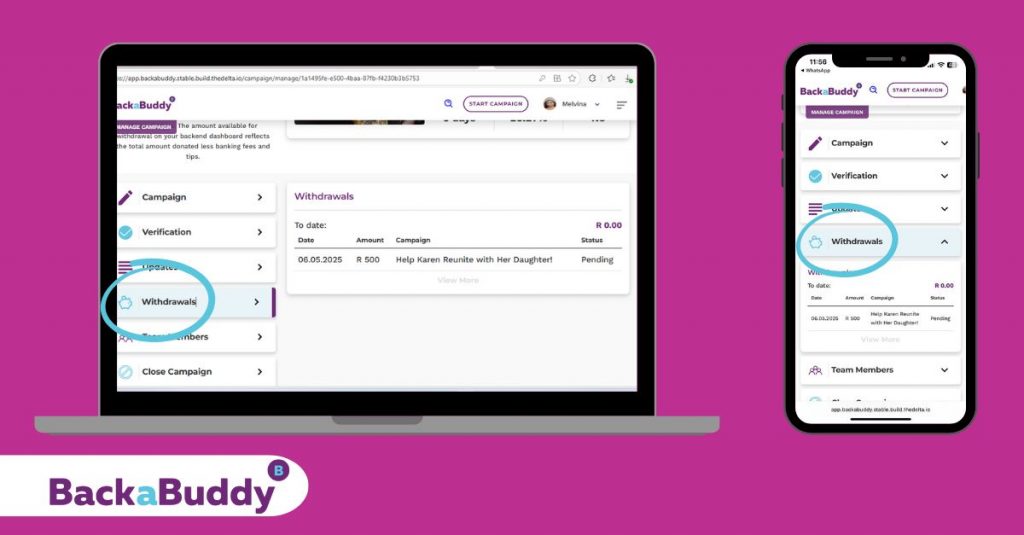
Navigate to “Withdrawals” from your menu.
-
For both Blue Tick and Self-Managed campaigns, you will see the status of your payout request.
-
If your payout has been successfully processed and is waiting to be paid, the status will show as “Pending”.
-
Once the payout has been made, the status will update to “Paid”.
Checking the “Withdrawals” section is the quickest way to confirm your payout’s status without needing to contact support.
Important Notes
-
Processing Time:
Payouts usually take 3 to 10 business days to process.
-
Proof of Payment:
If you need a proof of payment, please contact the BackaBuddy team.
-
International Payouts:
For international bank accounts, contact the team to complete the “International Payout” form.
(International payouts may take a bit longer.)
-
For Blue Tick Campaigns:
Funds must be paid directly to the organisation’s bank account (except in the case of reimbursements, which require valid proof).
Troubleshooting
by Zane Groenewald | Jul 22, 2025 | Tips
Read This First Time Crowdfunding Guide Before You Get Started
You’re almost ready to launch — but before you do, here’s what we’ve seen make all the difference:
- Campaigns with early support from family and friends raise up to 2X more funds.
- To build momentum, we recommend getting 3–5 donations from people you know shortly after launching — before sharing your campaign widely on social media.
Think of it like a dance floor — no one wants to be the first one on, but once a few familiar faces step up, others feel comfortable joining in. The same is true for your campaign.
Those first 3–5 donations from close friends or family are powerful. They show others that your campaign is real, supported, and deserving of support.
Early donors often include heartfelt messages that vouch for your character and story — helping build trust with potential donors who may not know you personally.
Seed donations don’t just get the ball rolling — they show that your target is achievable. They give your campaign momentum, credibility, and an emotional anchor for others to follow.
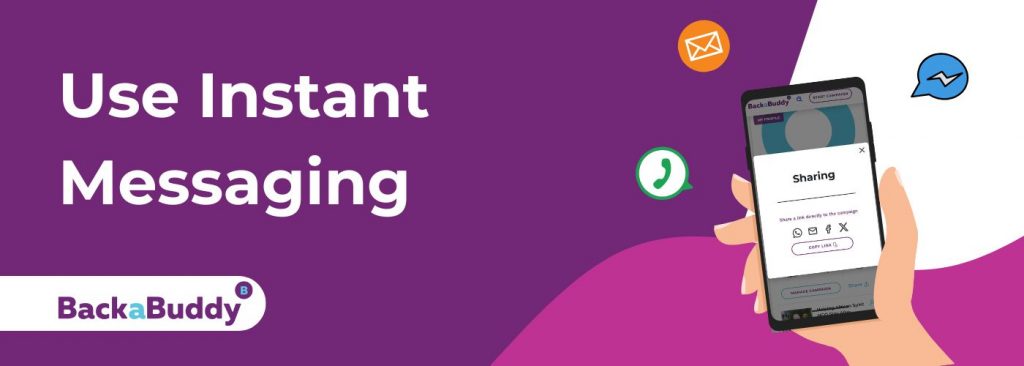
The fastest way to build early momentum is by reaching out personally.
Start by sending a short, sincere message to close friends and family via WhatsApp, Messenger, or Email. Let them know your campaign is active — and how much their early support would mean to you.
- Be clear and specific:
What are you raising funds for?
Why does it matter to you?
What difference will their support make?
Once you’ve received a few initial donations, you can post your campaign link to your WhatsApp Status, family groups, or community chats to grow your support circle.
Early messages set the tone. Personal connection creates trust. And trust leads to donations.
It’s tempting to post your campaign right away — but going public too soon can make it harder to gain traction.
Campaigns shared with a wide audience while still sitting on R0 often struggle to get support. Without early donations to build trust, even powerful stories can be overlooked.
Start with private messages. A few early donations give your campaign credibility and make it easier for others to follow.
A little patience upfront can make a big difference in the long run.
Once you’ve had your first donations, expand your reach to:
- Extended family, neighbours, co-workers
- Social media friends and followers
- School, university, church or community networks
- WhatsApp groups, local businesses, alumni communities
- Nonprofits, media, or influencers who align with your cause
Personalise your message, explain the impact their support will have, and invite them to donate or help share your campaign.
Helpful Resources
by Zane Groenewald | Jul 8, 2025 | Tips
Launching a crowdfunding campaign can feel overwhelming — but you don’t have to figure it all out on your own.
This 14-day guideline is not a checklist or a rulebook. It’s a practical, compassionate roadmap built from what we’ve seen work best across thousands of successful BackaBuddy campaigns.
Each day offers one simple, doable action to help you build momentum, grow your reach, and deepen connection with your supporters — all in a way that feels authentic to you. Whether your cause is personal, joyful, or rooted in something more difficult, we’re here to help you share your story with confidence.
Use what feels right, skip what doesn’t, and come back to it anytime you need support.
Day 0: Let’s Get Your Campaign Ready to Succeed
Before sharing your campaign, here’s how to set yourself up for success:
- Write a clear, heartfelt story (200–500 words):
-
- Who you’re fundraising for
- What the funds are for
- Where this is happening
- Why now
- What donations will cover
- End with a thank you and a call to action
Add 3–5 high-quality, friendly images
- Optional: Film a short 30–60 second video introducing yourself and your cause
- Set a realistic, specific goal (e.g. R2,000 for school fees or R5,000 for medical transport)
- Enable thank-you messages
- Wait to verify — we’ll do that after a few donations
Read our guide: ’10 Elements for Writing a Great Backabuddy Crowdfunding Story’
Campaigns with strong stories, clear visuals, and a video raise up to 4x more.
Day 1: Start With Seed Support
Before going public, message 5–10 close friends or family privately via WhatsApp, Messenger or Email.
Suggested message:
“Hi [Name], I’ve just launched a crowdfunding campaign on BackaBuddy to help with [brief description – e.g. my mom’s surgery or school fees.
Before I share it more widely, I wanted to ask if you’d consider being one of the first to support it — even a small donation or a quick share would mean a lot.
Here’s the link: [insert link]“
Campaigns with early support raise up to 2x more.
Day 2: Share on WhatsApp Status and Small Groups

Once you’ve received 3–5 donations, it’s time to share a little wider.
- Post to your WhatsApp Status
- Share in family, school, or neighbourhood groups
Suggested message for groups:
“We’ve just launched our BackaBuddy campaign to help with [brief cause].
Thank you to everyone who’s already helped. If you’d like to support or share, here’s the link: [insert link]”
Suggested WhatsApp Status:
“Raising funds for [short cause]. Please support or share [insert link]”
How to post a WhatsApp Status:
1.Open WhatsApp
2.Tap Status
3.Tap the Pencil icon to write your message
4.Paste your link
5.Tap the spacebar after your link (this shows the preview)
6.Tap Send
Read our guide: “Promoting your crowdfunding campaign on WhatsApp”
Tip: Refresh your status every few days with thank-you updates or new progress.
Day 3: Reach Out to Your Wider Network
Think of people outside your close circle who would still care:
-
-
- Extended family
- Old classmates or teachers
- Former or current colleagues
- Church or community groups
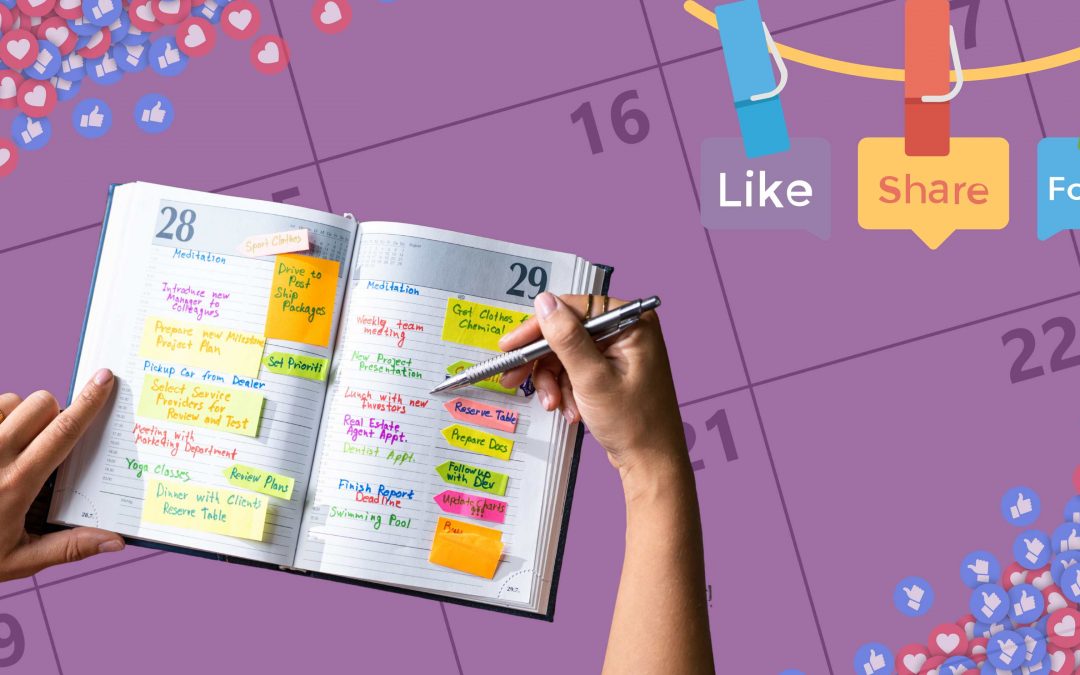
Send a brief, warm message with your campaign link. A personal approach goes a long way.
Day 4: Post Publicly on Social Media
You’re ready to post more broadly.
Tips:
- Write a friendly caption (2–3 lines)
- Add a photo or video
- Include the donation link or say “link in bio”
Example Facebook post (150–200 words):
“We’ve launched a BackaBuddy campaign to support [Name], our [relationship if applicable – e.g. daughter or friend].
So far, we’ve raised R[amount] of our R[goal] — and we are so grateful.
Donations will help cover [short impact – e.g. physio or school fees].
Please support or share if you can.
[Insert link]
Instagram post example:
“We’ve launched a campaign to help [Name] with [brief cause].
R[amount] raised so far of our R[goal].
Every bit helps.
Link in bio.”
Tip: Pin your post to your profile and tag people who’ve supported you.
Read our guide: 7 Effective Ways to Promote Your Crowdfunding Campaign and Get Donations”
Day 5: Ask for Social Media Champions

Ask 2–3 friends or early donors to reshare your post with a personal note.
Suggested message:
“Hi [Name], thanks again for your support.
Would you mind resharing the post I shared about the campaign, and maybe adding a few words about how you know me or why you chose to support?
Here’s the link to the post: [post link]
Campaign link: [BackaBuddy link]”
Example caption they can use:
“I’m resharing this post from [Your Name].
They’re raising funds for [cause] and I’ve already donated.
If their story moves you, please donate or share: [insert link]”
Also do this:
-
- Go to your campaign page > Manage Campaign > Edit
- Add the link to your original social media post so others can find and reshare it
- Tag and thank supporters when they reshare
Day 6: Film a Quick Campaign Video (If You Haven’t Yet)
A 30–60 second video filmed on your phone can boost donations up to 4x.
What to say:
-
- Introduce yourself
- Share what’s happening
- Say why help is needed now
- End with: “If you can support or share, we’d be grateful”
Use the video on:
-
- Your campaign page
- WhatsApp Status
- Social media
- Email to [email protected] (for help sharing with donors)
Day 7: Start Verification
Once you have a few donations:
-
- Log into your dashboard
- Upload your ID and banking details (secure and confidential)
- Verification builds trust and allows payout
If anything is unclear, your campaign manager is here to help.
Day 8: Share in Groups or Forums
Expand your reach by sharing in:
-
- Local Facebook or community groups
- WhatsApp chats with neighbours or teams
- Forums or cause-based spaces
Include a short, genuine message — don’t just post a link.
Day 9: Share a Story or Video Update
Post a quick thank-you or progress update to keep your story visible.
Suggested caption:
“We’ve raised R[amount] so far — thank you.
This campaign is for [Name], who is [short story].
We’re close to our goal of R[target].
If you’d like to support or share: [link]”
How to post a link in Instagram Stories:
1.Tap Stories
2.Select a photo/video
3.Tap the Sticker icon
4.Choose the Link sticker
5.Paste the link and customise text
6.Post
Day 10: Celebrate a Milestone
Whether you’ve raised R1,000 or more, thank your supporters.
Suggested caption:
“Thanks to over [donor count] people, we’ve raised R[amount] of R[goal].
This has already helped us [impact so far].
[Name] is [brief description].
This support has [e.g. lifted a huge weight].
Thank you.
If you’d like to support or share, here’s the link: [BackaBuddy link]”
Day 11: Share Again (With a New Angle)
Most people need reminders. Share again with a fresh approach:
-
- Use a different photo
- Add a short update
- Include a quote or story
- Mention how support is helping
Day 12: Follow Up Personally
Message people who:
-
- Said they’d donate
- Reacted but didn’t click
- Helped in past campaigns
Use a gentle reminder:
“Hi [Name], just checking in — no pressure, but if you’d still like to support or share, here’s the link.”
Day 13: Share Your Story with the Media (Optional)
If your campaign has 20+ donations and a strong story, you can explore media coverage.
-
- Write a short press release
- Include 1–2 photos and a quote
- Submit to platforms like MyPR or Pressportal
- You can also contact local journalists
Read our guide: “How to Share Your Crowdfunding Campaign in the Media”
Day 14: Donor Update (Sent by BackaBuddy)

Let your donors know how it’s going.
Email [email protected] with:
-
- 2–3 short sentences about progress
- What the support has meant
- A photo (optional)
We’ll send the update on your behalf. Donor updates keep supporters engaged and help build long-term trust.
There’s no perfect way to run a campaign. What matters is showing up, sharing honestly, and staying connected. The BackaBuddy team is here to help you every step of the way — from setting up your campaign to reaching new audiences.
If you ever feel stuck or unsure, reach out. You’re not alone — and you’ve got this. Get your questions answered by our friendly support team, Contact Us.