
A great crowdfunding campaign deserves to be seen. Your campaign page tells the full story, while social media Stories help keep your fundraiser visible, give people a quick reason to care and make it easy for them to donate or share.
On Instagram, Facebook and TikTok, a clear, human Story can introduce your campaign to new people, update supporters and remind your community that their help matters. Better Stories also make it easier for BackaBuddy to review and, where possible, reshare your content to our own Stories.
The quick answer: First, secure three to five seed donations from people you know. Then create a public, portrait Story with a relevant photo or video, a short human message, a clear call to action, a clickable link to your specific BackaBuddy campaign and a tag to @BackaBuddy.
Following this guide makes your Story eligible for review, but does not guarantee that it will be reshared.
In this guide
- Why early momentum matters
- What makes a strong campaign Story
- How to create Stories for Instagram, TikTok and Facebook
- How to use WhatsApp Status to share your campaign
- Campaign Story dos and don’ts
- When BackaBuddy will not reshare a Story
- A final pre-posting checklist
Before sharing publicly: build your first bit of momentum
A strong Story can help your campaign reach more people, but social media should amplify existing momentum rather than be the first step in your fundraising journey.
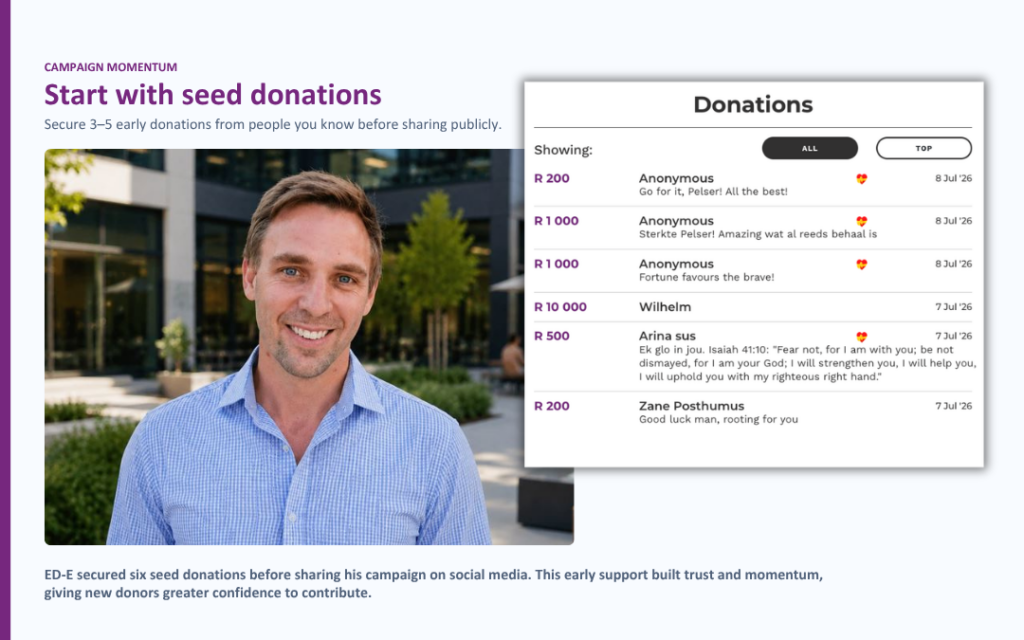
Before sharing your campaign publicly, aim to secure at least three to five seed donations from people who already know and trust you. These can be small contributions from family, friends, colleagues or members of your immediate community.
Early donations show that real people are already supporting your cause. This starts building trust and may give new visitors greater confidence to contribute.
Begin by sharing your campaign personally through:
- One-to-one WhatsApp messages
- Direct messages to close friends and relatives
- Family, workplace or community groups
- Personal conversations with people who understand your situation
Once your campaign has received its first few donations, you can begin sharing it more widely through Instagram, Facebook, TikTok and WhatsApp Status.
Remember: Social media is an amplifier, not a quick fix. Your closest network will usually form the foundation of your campaign, while public Stories can help that support travel further.
What does a strong campaign Story look like?
People are more likely to interact with a Story when they can quickly understand:
- Who the campaign is helping
- What has happened
- Why support is needed
- How their donation could help
- Where they can donate
Your Story should include five essential elements:
- A relevant photo or video
Use a clear, respectful image or video connected to the person, family, animal, organisation or cause behind the campaign.
2. A short, human message
Explain the campaign in one or two simple sentences. Avoid filling the entire screen with text.
For example:
“Thandi needs urgent surgery to help her walk without pain. We’re raising R80,000 towards her treatment.”
3. A clear call to action
Tell people exactly what you would like them to do:
- Donate now
- Help us reach our goal
- Share this campaign
- Tap the link to learn more4. A clickable BackaBuddy campaign link
Always link directly to your campaign, not only to the BackaBuddy homepage.
Typing a web address onto an image or video does not make it clickable. Use the platform’s Link sticker or another clickable linking option.
5. A BackaBuddy tag
Tag the official @BackaBuddy account so that our team is notified and can review your Story.
Your account and Story must also be public. If your account is private, we may not be able to view or reshare your content.
A quick note about algorithms and engagement
There is no guaranteed algorithm trick that will make a campaign go viral. Social platforms try to show people content they are likely to watch and interact with. A strong opening image or video, readable text, captions, a clear message and a simple next step give viewers more reason to keep watching, tap, reply or share.
You can reuse a good Story, but refresh it. Change the opening image, wording, campaign update, milestone or call to action instead of posting the exact same Story every time.
How to post an Instagram Story
Instagram is usually the simplest platform for sharing a clickable campaign Story.
- Open Instagram and tap the + button, or swipe right from your feed.
- Select Story.
- Record a vertical video or upload a portrait photo or video from your phone.
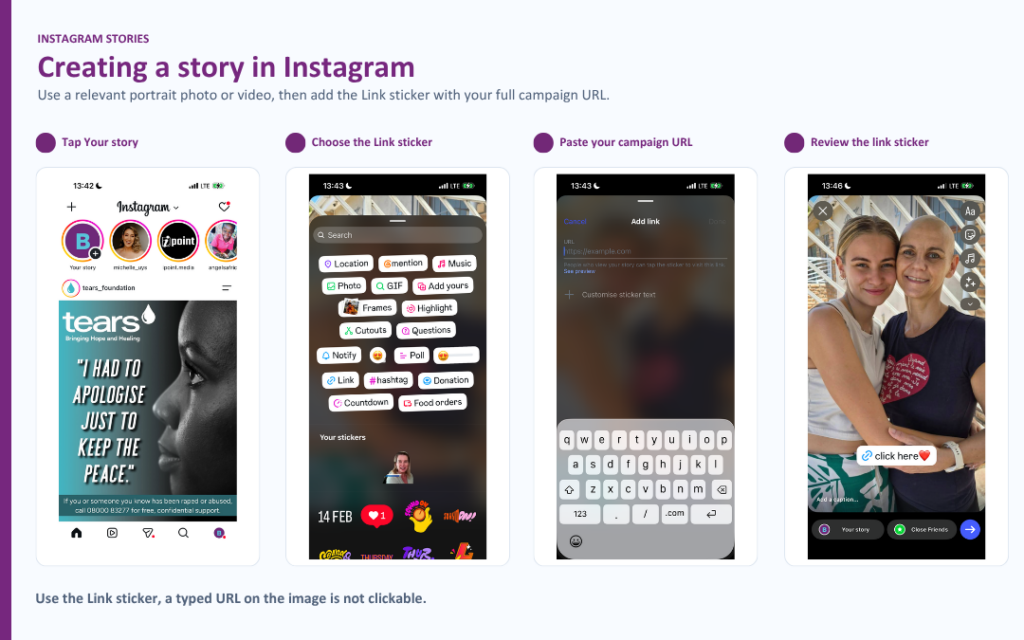
Show the Instagram Create menu with “Story” selected.
4. Add a short explanation of your campaign.
5. Tap the Sticker icon and select Link.
6. Paste your full BackaBuddy campaign URL.
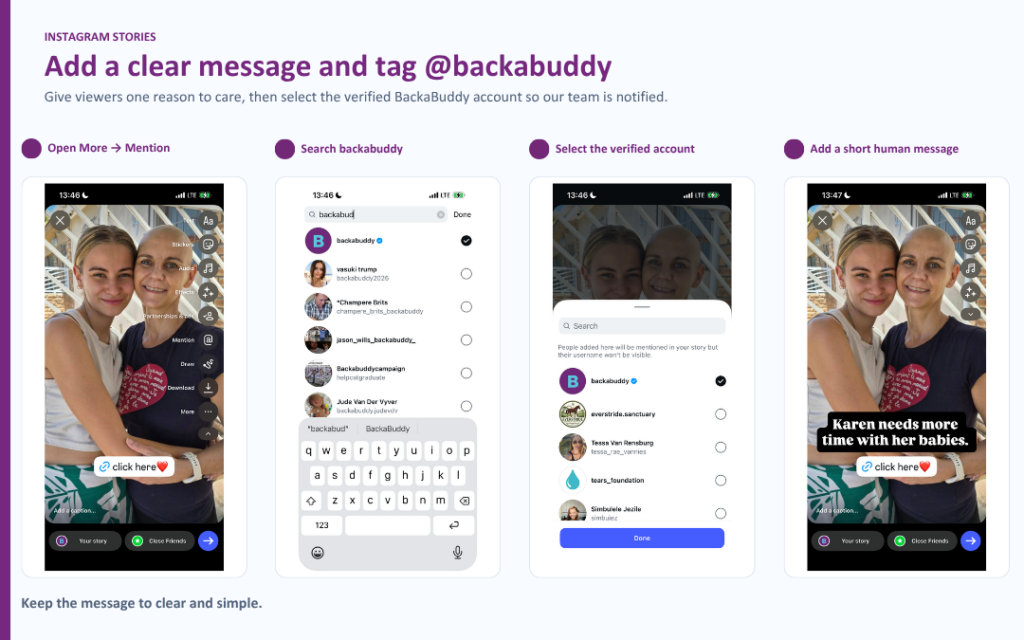
7. Rename the sticker with a clear call to action, such as Donate now or Support our campaign.
8. Add a Mention sticker or type @BackaBuddy, then select the official account.
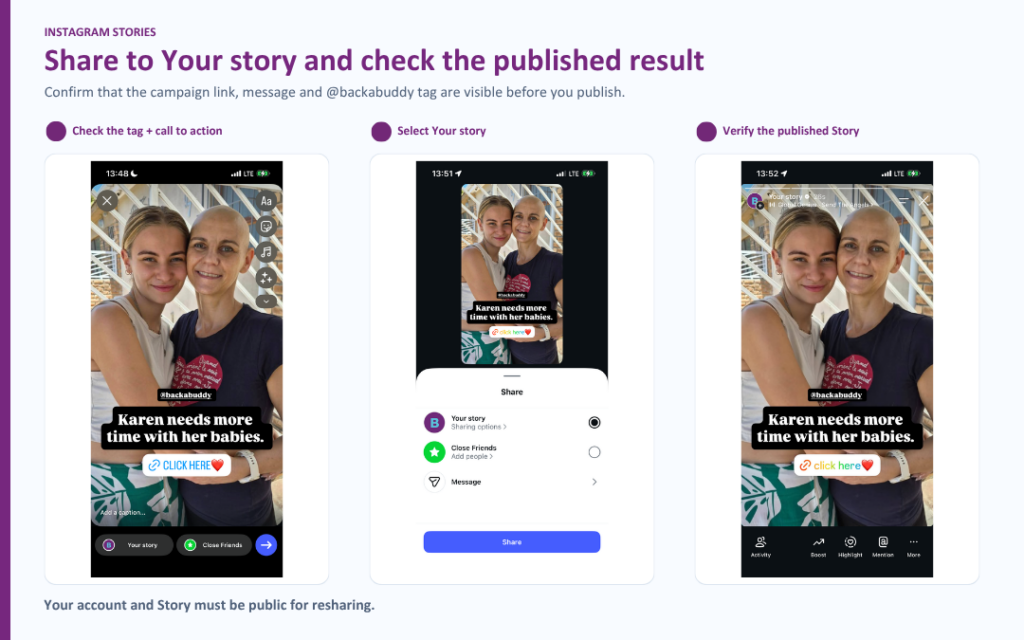
Show the completed Story with the @BackaBuddy mention, link sticker, short message and relevant visual.
- Add suitable music if it supports the mood of your Story. Keep it quiet enough for spoken words to be heard.
- Share the Story to Your Story, not only to Close Friends.
Instagram notifies an account when it is mentioned in a Story. However, BackaBuddy may still be unable to reshare it if the account is private or the creator has disabled Story resharing. Learn more about Instagram Story mentions and resharing and Instagram Link stickers.
How to post a TikTok Story
TikTok Stories can include photos, text, videos, sounds and stickers, and remain available for 24 hours. TikTok’s official Story instructions are available here.
- Open TikTok and tap the + button.
- Select Story, or tap your profile picture to create a Story.
- Record a vertical video or upload a relevant photo or video.
Show the TikTok Create screen with “Story” selected.
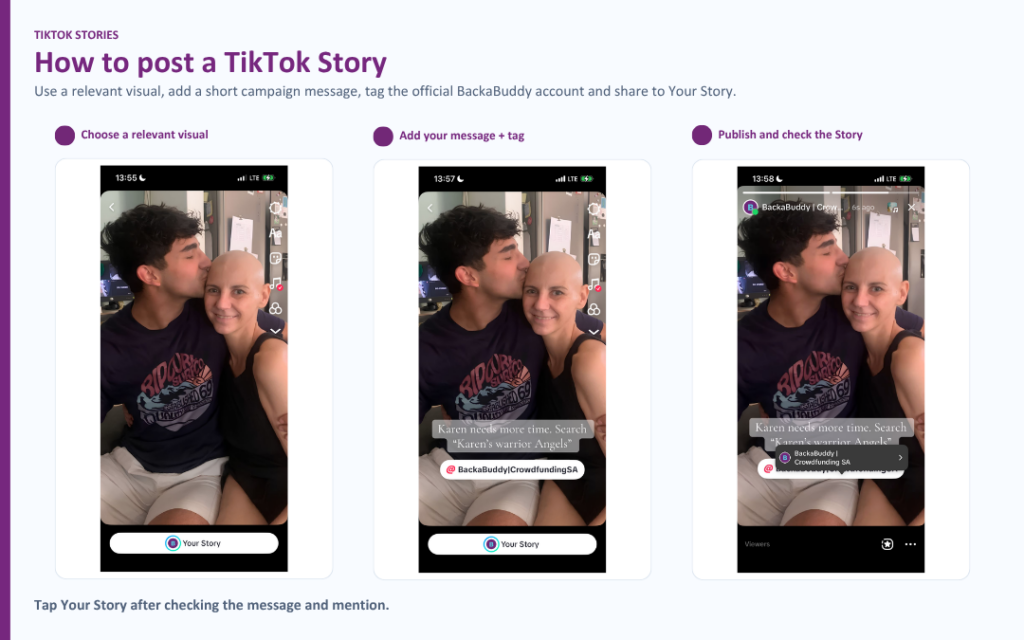
- Add a short explanation and clear call to action.
- Add appropriate music or sound if it improves the Story.
- Mention and select the official @BackaBuddy account.
Show the Story editor with a short campaign message and the @BackaBuddy mention.
4. If a clickable Link option is available on your account, add your full BackaBuddy campaign URL.
5. Set the Story’s audience to Everyone and make sure your account is public.
6. Tap Your Story to publish it.
Show the link option, where available, and the audience set to “Everyone”.
A web address typed onto a TikTok video is not a clickable link. If your account does not offer a clickable Story link, use Instagram or Facebook for your BackaBuddy reshare request instead.
How to post a Facebook Story
For Facebook, the most reliable option is to create a public post containing your campaign information and then share that post to your Story.
- Create a new Facebook post.
- Add a relevant, non-graphic photo or video.
- Write a short explanation of the campaign.
- Paste the full BackaBuddy campaign link into the post.
- Type @BackaBuddy and select the official BackaBuddy Page.
- Set the post’s audience to Public.
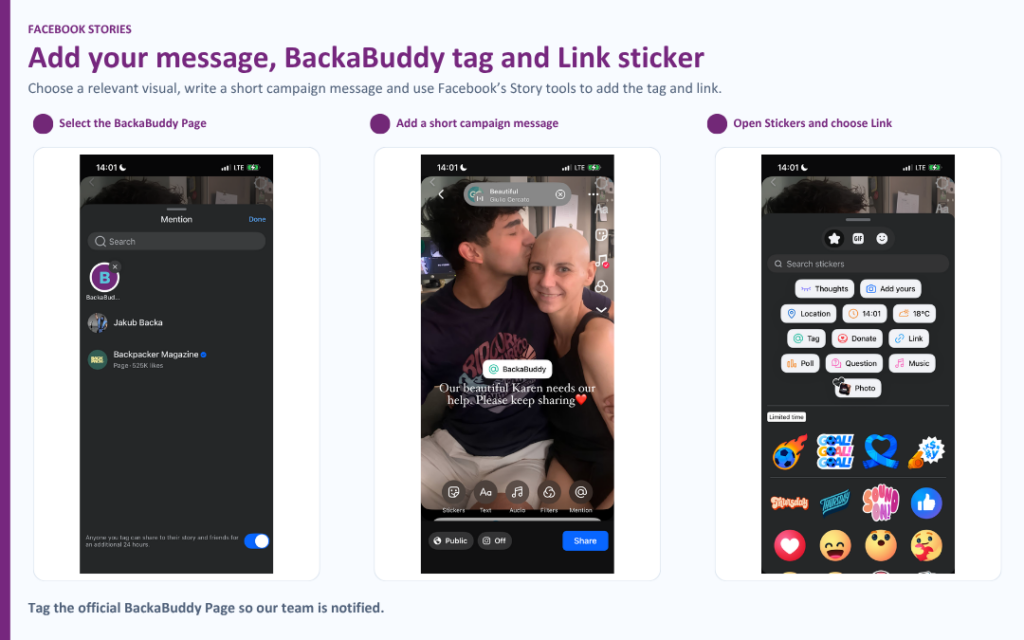
Show a completed public feed post with a relevant visual, short message, campaign link and @BackaBuddy tag.
7. Publish the post.
8. Tap Share beneath the post.
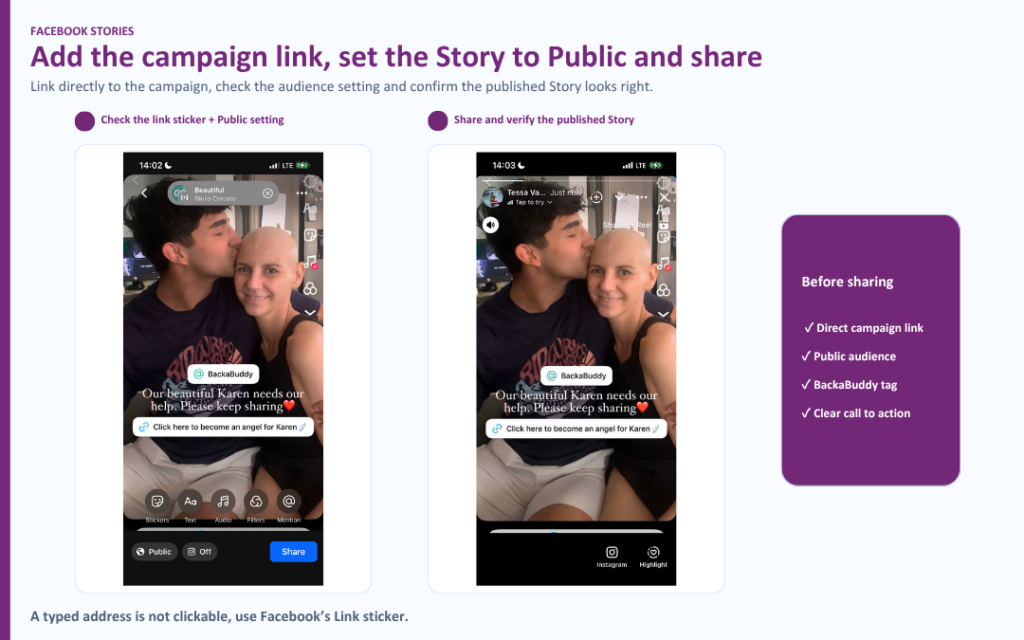
Show the Share menu with “Share to Your Story” selected.
9. Select Your Story.
10. Add a short call to action or suitable music, if available.
11. Make sure your Story privacy is set to Public.
12. Share it to your Story.
When a Facebook feed post is shared to a Story, viewers can tap the Story to open the original post and access its campaign link. See Facebook’s instructions for sharing a feed post to a Story.
You can also share an Instagram Story to Facebook, but check the Facebook version afterwards to make sure the campaign link works correctly.
How to share your campaign on WhatsApp Status
BackaBuddy cannot view or reshare WhatsApp Status updates. However, WhatsApp is still one of the most effective places to share your campaign because it reaches people who already know and trust you.
Once your campaign has received its first few seed donations, WhatsApp Status is a useful way to share it with your wider network.
- Copy the full link to your BackaBuddy campaign.
- Open WhatsApp and go to Updates.
- Tap Add Status.
- Share a relevant portrait photo or video with a short campaign message.
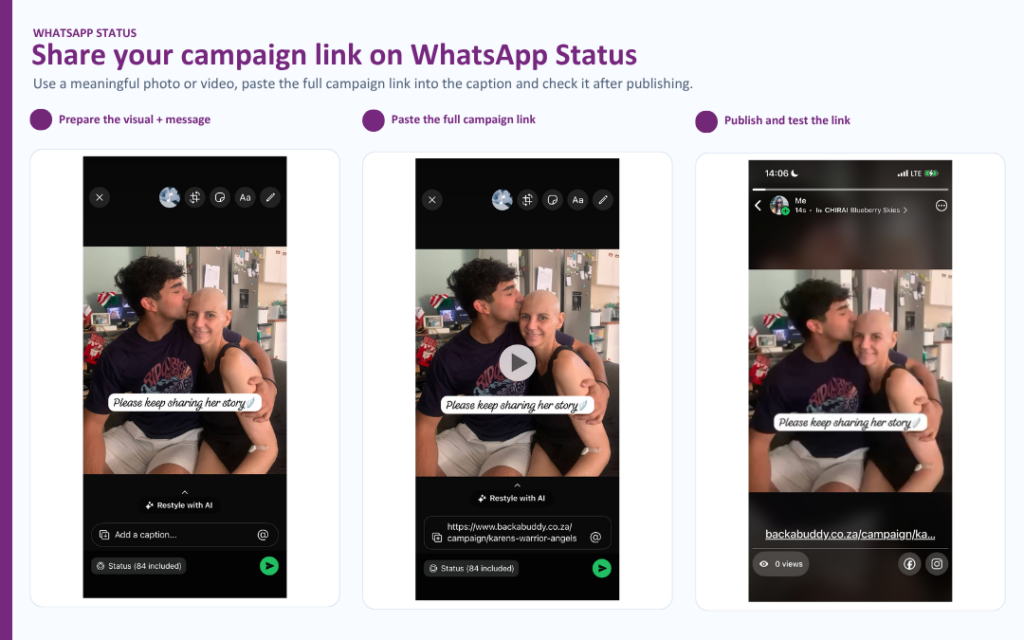
Show the Updates screen and the Add Status button.
5. Create a second, text-based Status and paste the full campaign link or put the link in the captions to make it clickable.
6. Wait for WhatsApp to generate the link preview.
7. Add a clear call to action, such as Tap to donate or Please help us reach our goal.
8. Check that the campaign link opens correctly before sharing it more widely.
9. Encourage your contacts to donate and share the campaign with their own networks.
Show the visual Status followed by the text-based Status containing the tappable campaign link and call to action.
WhatsApp automatically creates a visual preview when a link is posted to a Status, making it easier for contacts to tap through to your campaign.
Do not share only the campaign link. Use a meaningful photo or video first, followed by the clickable link and a clear request for support.
Campaign Story dos
- Use portrait content in a 9:16 format. A size of 1080 × 1920 pixels works well.
- Use a clear photo or video that relates directly to the campaign.
- Keep your message short, honest and easy to understand.
- Include a clickable link to your specific BackaBuddy campaign.
- Tag @BackaBuddy on every Story you would like us to review.
- Keep your account and Story public.
- Add captions to videos where someone is speaking.
- Use suitable music from the platform’s music library.
- Keep important text away from the very top and bottom of the screen.
- Protect the dignity and privacy of everyone shown.
- Get permission before sharing someone else’s image or personal information.
- Reuse successful Stories, but change the photo, video, opening line or update.
- Share progress, milestones and thank-you messages, not only urgent appeals.
- Test your campaign link after posting.
Campaign Story don’ts
- Do not use graphic or disturbing imagery.
- Do not show blood, open wounds, medical procedures or severe injuries.
- Do not show deceased people.
- Do not include nudity or exposed private areas.
- Do not exploit someone’s pain, fear or vulnerability.
- Do not post only a campaign link without an accompanying photo or video.
- Do not type an unclickable URL onto the screen and expect viewers to copy it.
- Do not use an unrelated stock image, meme or random background.
- Do not overwhelm the screen with paragraphs of text.
- Do not use landscape visuals with large blank spaces.
- Do not use loud or inappropriate music that distracts from a sensitive campaign.
- Do not share a Story from a private account if you would like it reshared.
- Do not forget to tag BackaBuddy.
For sensitive medical, emergency or animal-welfare campaigns, choose a dignified, non-graphic image of the person, family or animal instead. The written message can explain the seriousness of the situation without showing distressing content.
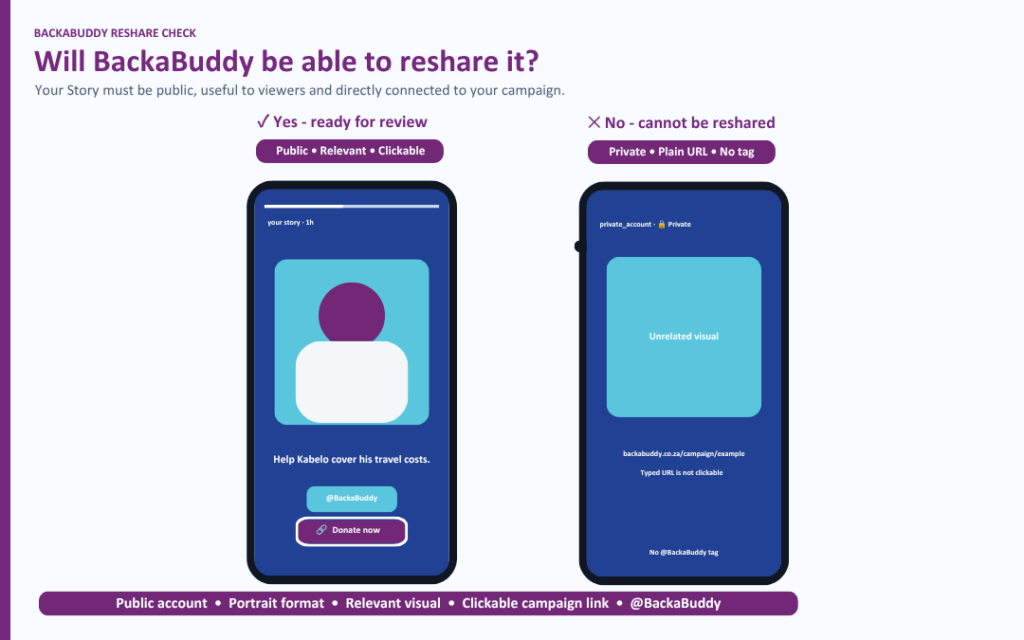
When we will not reshare a Story
BackaBuddy will not reshare a campaign Story if:
- BackaBuddy has not been tagged or notified
- The account or Story is private
- There is no BackaBuddy campaign link
- The campaign link is not clickable
- The Story contains only a link, with no meaningful photo or video
- The visual is unrelated to the campaign
- The content contains graphic imagery, blood, severe injuries, nudity or deceased people
- The Story cannot be reshared because of the account’s settings
- The content does not meet our platform or community standards
Final checklist
Before sending us your Story, ask:
- Is my account public?
- Is my Story in portrait format?
- Does it include a relevant photo or video?
- Does it briefly explain the campaign?
- Is the BackaBuddy campaign link clickable?
- Have I tested the link?
- Have I tagged @BackaBuddy?
- Is the content respectful and non-graphic?
- Is there a clear reason for someone to donate or share?
If you can answer yes to all of these questions, your Story is ready to be reviewed.